The basics
What a smart lock installation really involves
Mounting the lock takes minutes. Making it work every day takes a little more.
More than four screws and an app
The box for a smart lock usually shows a screwdriver and a promise that installation takes fifteen minutes. On a new door with a perfectly aligned deadbolt, that can be true. On most Delaware homes, where the front door has been painted a few times, the frame has shifted a little with the seasons and the original deadbolt was installed by someone in a hurry, the fifteen minute version produces a lock that works on the kitchen table and struggles on the door.
A motorized deadbolt has a small motor and a limited amount of force. A person turning a thumb turn by hand can push a bolt past a strike plate that is slightly out of line without thinking about it. A motor cannot. It tries, stalls, reports a jam and drains the battery trying again. The single most important part of a smart lock installation is making sure the bolt slides into the strike with no resistance at all, in every season, whether the door is pushed closed gently or slammed.
That means looking at the door before the lock comes out of the box. We check how the door hangs, whether it rubs the frame, whether the latch catches cleanly, how deep the bolt hole in the frame goes, and whether the existing bore and backset match what the new lock expects. Then we install the lock, set it up with your phone, and test it with the door closed the way your household actually closes it.
Types of smart locks
Replacement deadbolts, retrofit units and keypad models
Smart locks come in a few broad families, and the right one depends on the door, the household and what you want the lock to do. None of them is best for every home.
A full replacement smart deadbolt removes your existing deadbolt entirely and puts a new motorized one in its place. It usually has a keypad or a touch surface on the outside and a battery pack on the inside. Many include a key cylinder as a backup, although some do not. This type gives the most complete smart experience and is the most common choice when the existing deadbolt is old or worn.
A retrofit smart lock keeps your existing deadbolt and exterior key cylinder and replaces only the inside thumb turn with a motorized unit. From outside, the door looks unchanged and your current key still works. This is popular with renters, with homeowners who like their existing hardware, and with people who want smart features without changing the look of the door. The trade off is that the retrofit unit depends completely on the existing deadbolt being in good shape and well aligned.
A keypad smart lock focuses on codes rather than phone control, although many offer both. Codes can be assigned to family members, cleaners, dog walkers or guests, and removed when they are no longer needed. Some keypad models connect to a home network and some work entirely on their own. Our separate page on keypad lock installation covers code based locks that are not connected to any app at all.
There are also smart handle sets and smart levers, where the whole entry set including the handle is motorized or electronic. These are more common on side doors and on doors where the owner wants a single piece of hardware rather than a separate knob and deadbolt.
How smart locks talk to your phone
Smart locks connect in different ways. Some use Bluetooth, which works when your phone is close to the door. Some use Wi-Fi, either built in or through a small bridge plugged into an outlet nearby, which lets you check and control the lock from anywhere. Others use home automation protocols that need a separate hub. Newer locks may support shared standards that let them work with more than one home system. The connection type decides how far away you can control the lock, how quickly it responds and how long the batteries last. A lock with Wi-Fi built in usually uses more battery than a Bluetooth lock paired with a bridge.
Before recommending a lock, we ask how you want to use it. If you only want to unlock with your phone when you walk up, Bluetooth may be enough. If you want to let in a delivery driver while you are at work, you need remote access. If the home already runs on a particular system, the lock should match it.
Door preparation
What we check before the lock goes on
- The bore and backset. Most residential doors have a round bore for the lock body and a backset, the distance from the door edge to the center of that bore, that falls in one of two common sizes. Most smart locks adjust between them, but an older door with an unusual bore, a previous lock that left oversized holes, or a door that was drilled slightly off center needs attention first.
- Door thickness. Smart locks are designed for a range of door thicknesses. A thick custom door or a thin older door may need a different mounting kit or a different lock.
- The strike and the bolt hole. The bolt must slide fully into the frame. If the hole behind the strike plate is too shallow, the bolt stops short and the lock reports a jam. We deepen the hole and adjust or replace the strike as needed.
- How the door hangs. A door that sags on its hinges pushes the bolt against the top or bottom of the strike. Tightening or replacing hinge screws, sometimes with longer screws into the framing, is often the real fix for a smart lock that jams.
- Weatherstripping pressure. Thick weatherstripping pushes the door outward and loads the bolt. A motor that has to fight that pressure every time drains batteries quickly.
- Storm doors. A storm door with a handle close to the entry door can hit a bulky exterior keypad. We check the clearance before choosing a lock.
- Wi-Fi signal at the door. A Wi-Fi lock at the far end of a house with a weak signal will lose its connection. Sometimes a bridge or a range extender solves it, and sometimes a different lock is the better choice.
How it works
What happens during the installation visit
We start with a short conversation about who will use the lock, how they will get in, and what should happen when the batteries run low or the internet goes down. That conversation decides the lock and the settings more than any feature list does.
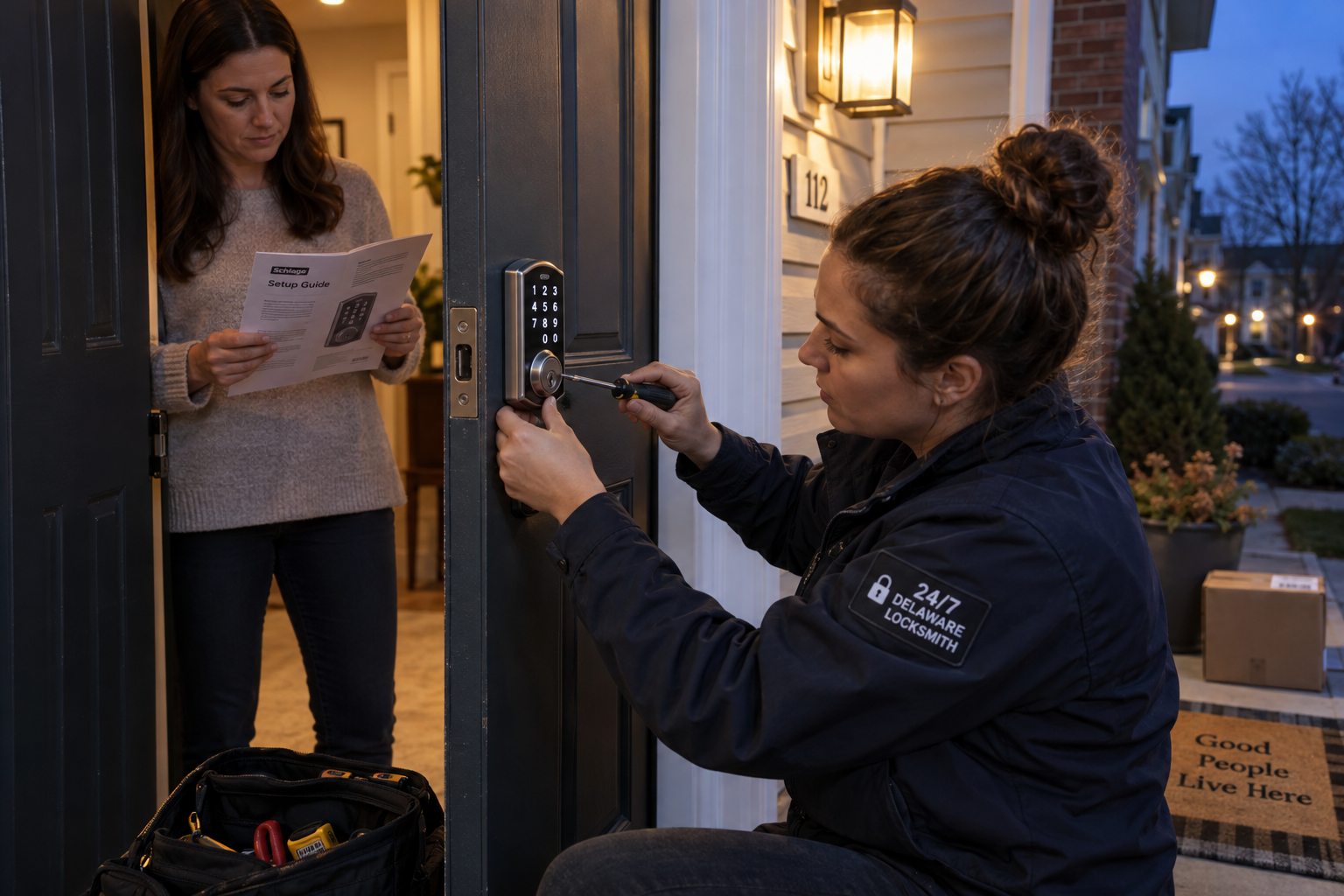
Then we remove the existing deadbolt, inspect the door and frame, and correct anything that would make the bolt drag. That can mean deepening the bolt hole, moving or replacing the strike plate, tightening hinges or adjusting the door so it closes cleanly. On older homes in Wilmington and New Castle with original wood doors, this step often takes longer than mounting the lock itself.
The smart lock goes on next, following the manufacturer's instructions, with the cable routed so it will not pinch and the mounting plate aligned so the motor turns the bolt without side load. We run the lock's calibration so it learns the door's handing and the exact positions of locked and unlocked.
Next comes setup. We help you install the app, create the owner account, add the lock, and set up any bridge or hub. We add user codes or phone access for the people you name, and we show you how to remove them. We set auto lock if you want it, and explain the trade offs.
Finally, we test the lock with the door closed the way it closes in daily life, including a firm push and a gentle close. We test the backup key or the backup power method. We confirm that the lock reports its status correctly in the app. When it passes all of that, the job is done.
Backup access
What happens when the battery dies
Every smart lock needs a plan for the day the electronics do not cooperate.
Smart locks give plenty of warning before the batteries die. The app sends notices, the keypad may flash, and the lock may beep when it operates. The problem is that warnings are easy to ignore for a few weeks, and one day the lock simply stops responding.
Most smart locks offer a backup. Some include a key cylinder, so a physical key still opens the door. Some have terminals on the exterior where a nine volt battery can be held to power the keypad long enough to enter a code. Some keyless models rely entirely on the batteries and on the owner keeping them fresh. We explain which backup your lock has and make sure it works before we leave.
If your lock has a key cylinder, keep the key somewhere you can reach from outside the house, such as with a trusted neighbor or in a secure location, not in the kitchen drawer behind the locked door. If your lock has no key, set a reminder to replace the batteries on a schedule, because the lock will eventually stop.
If a smart lock has already failed and you are standing outside, a house lockout call gets you in without damaging the lock whenever possible.
Security
What a smart lock does and does not change about security
A smart lock changes how people get in. It does not automatically make a door stronger. The bolt in most smart deadbolts is similar to the bolt in a good mechanical deadbolt, and the door is only as strong as the frame and the strike that hold that bolt. A smart lock on a weak frame is still a weak door. Our door frame security guide explains how to reinforce the frame, and those steps pair well with any new lock.
Where smart locks help is key control. With a mechanical lock, every key ever handed out is a key you cannot take back. With a smart lock, a code or a phone credential can be removed in seconds, and many locks keep a history of who opened the door and when. For households with rotating visitors, rentals with guests, or families where keys keep disappearing, that control is the main benefit.
Codes still need care. Avoid obvious codes such as birthdays, street numbers or repeated digits. Give each person their own code so you can remove one without changing everyone else's. Look at the keypad now and then for worn numbers that reveal a code, and change codes that have been shared too widely.
Keep the lock's firmware updated and the owner account protected with a strong password and two step verification where the app offers it. The account is part of the lock.
Choosing
Which smart lock fits which situation
| Situation | What usually fits |
|---|---|
| Renting, want to keep the landlord's key working | A retrofit unit on the inside that leaves the existing deadbolt and key in place, with permission from the landlord |
| Old worn deadbolt, want a full upgrade | A full replacement smart deadbolt with a keypad and a key backup |
| Frequent guests, cleaners or pet sitters | A lock with individual user codes and an activity history |
| Want to open the door for someone while away | A lock with built in Wi-Fi or a bridge, and a reliable signal at the door |
| Side or garage entry door used often | A keypad deadbolt or smart lever set with auto lock |
| Older household members who dislike phones | A simple keypad lock with large buttons and a key backup |
Avoid these
Smart lock mistakes we see often
- Installing on a door that already sticks. If the old deadbolt needed a push or a lift to lock, the smart lock will struggle with the same door. Fix the door first.
- Relying on auto lock without a backup. Auto lock is convenient until someone steps outside to get the mail without a phone or a code. Make sure everyone knows the backup.
- Sharing one code with everyone. A single shared code cannot be removed from one person without changing it for all of them.
- Ignoring low battery warnings. The warnings exist because the lock will eventually stop. Replace batteries when they first appear.
- Using rechargeable batteries without checking. Some locks misread the voltage of certain rechargeable batteries. Use what the manufacturer recommends.
- Forgetting the old keys. A retrofit smart lock keeps your existing cylinder, so every old key still works. If the key history is unknown, have the cylinder rekeyed at the same visit.
Local factors
Smart locks in Delaware homes
Humidity, cold snaps and older doors all play a part.
Delaware's summers are humid and its winters bring stretches of hard cold. Wood doors swell in August and shrink in January, which moves the bolt relative to the strike. A smart lock that was set up on a dry spring day can start jamming in midsummer. We allow a little extra clearance in the strike for that movement, which is one of the reasons a professional installation holds up better through the seasons.
Cold also affects batteries. A lock on an exposed north facing door in Kent County will drain batteries faster in January than the same lock in a sheltered entry. Lithium batteries can help where the manufacturer allows them.
Older homes in Wilmington, Elsmere, New Castle and Dover often have doors with unusual thicknesses, previous hardware holes and frames that have settled. Newer homes in Middletown, Townsend and Smyrna tend to have standard doors that accept most smart locks easily. Rentals around Newark bring questions about landlord permission and key access, which we answer before installing anything.
Questions
Frequently asked
Can a smart lock go on my existing door?
Almost always. Most smart locks fit the standard bore and backset used on residential doors. Doors with unusual thickness, old oversized holes or a badly aligned frame may need preparation first. We look at the door before recommending a lock so the one you buy fits.
Will my smart lock stop working if the internet goes down?
Most smart locks keep working locally when the internet is down. Codes on the keypad and Bluetooth access from a nearby phone usually continue. What stops is remote access and remote notifications. We explain how your specific lock behaves during setup.
Why does my smart lock keep saying it is jammed?
Usually the bolt is dragging on the strike plate or hitting the bottom of a shallow bolt hole. The motor has less force than a hand, so small misalignments that a person would not notice stop it. Adjusting the strike, deepening the hole or fixing a sagging door usually solves it.
Can I install a smart lock in a rental?
Often yes, with the landlord's permission. A retrofit unit that replaces only the inside thumb turn leaves the exterior hardware and the landlord's key untouched. Check your lease first and keep the original parts so they can be reinstalled when you move out.
How long do smart lock batteries last?
It varies with the lock, the connection type, how often the door is used and how cold the door gets. A well aligned lock uses less power than one fighting a tight strike. Replace batteries when the first low battery warning appears rather than waiting for the lock to stop.
Should I keep a key backup?
We recommend it for most homes. A key cylinder or another backup method means a dead battery or a failed motor does not become a lockout. If your lock has no key, set a regular battery reminder and know how the emergency power method works.
Is a smart lock more secure than a regular deadbolt?
It is not automatically stronger. The door, frame and strike decide how well a door resists force. A smart lock's advantage is control over who can get in, with codes that can be removed instantly and a history of entries. Pair it with a reinforced strike for the best result.
Can you set up codes for my family and cleaners?
Yes. We set up the owner account and add codes or phone access for the people you name, and we show you how to add, schedule and remove them yourself afterward.
Ready for a smart lock that works every time?
Call and we will fit the lock to the door, set up the app and confirm the backup before we leave.